1. Log in to your ADP account at: https://workforcenow.adp.com
2. From the home screen, select Myself.
3. Under the header, My Information, click on Profile.
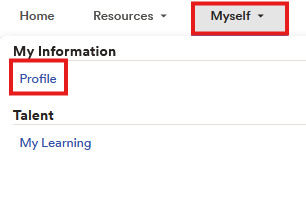
4. Under Personal Info (to the left-hand side), click on View more.
5. Scroll down until you've reached the Address sections, and then enter your new address information.
6. Click Save to submit the update.
Note: You may receive a confirmation notification once the change has been processed.
Important Reminders
Address changes may impact payroll tax withholdings if you move to a new state.
Please update your address as soon as possible to avoid delays in receiving tax documents (W-2) or other important mail.
If the system does not allow you to edit your address, please contact HR for assistance.
Was this article helpful?
That’s Great!
Thank you for your feedback
Sorry! We couldn't be helpful
Thank you for your feedback
Feedback sent
We appreciate your effort and will try to fix the article